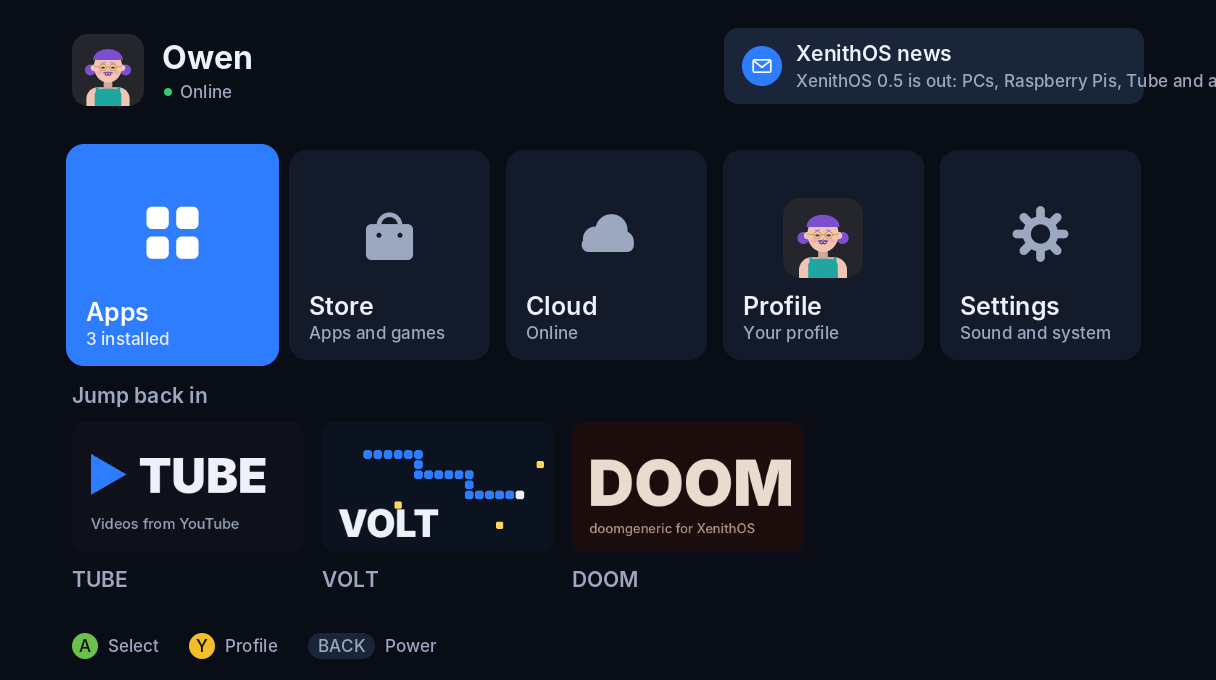
XenithOS is a homebrew console system. It runs on an Xbox 360 in place of the Microsoft dashboard, and on PCs and Raspberry Pis as a console you can switch to a normal Linux desktop. It has its own home screen, profiles with avatars, a store, YouTube, DOOM and a light-trail game.
Every copy uses XenithOS Cloud, the free service this page runs on: profiles, the Store, news, leaderboards and Tube (YouTube) live here, for everyone. It's written in C, on libxenon for the Xbox and SDL2 everywhere else.
What it looks like
These come from the XenithOS simulator, which runs the exact code that goes on the console and saves the frames as images.
Players
Everyone with a XenithOS profile. Your gamertag and avatar are saved to XenithOS Cloud, so they follow you to any Xbox, PC or Pi. You can link yours to an OwenCosta account, which works across Owen's other projects too.
Loading...
VOLT leaderboard
| # | Player | Score |
|---|
In the store
| Item | Size |
|---|
Where it's at
"Works" in the Xbox column only means I've seen it working on the real console. Everything else has run in the simulator or on Linux so far.
| Part | Builds | On the Xbox | Notes |
|---|---|---|---|
| Booting XenithOS from the exploit | yes | works | 0.3.1, 0.4.0 and 0.4.1 ran on the 360 S |
| Interface, Store updates | yes | works | 0.4.1 installed itself from the Store |
| Sound in games, app start times | yes | not yet | 0.5.1 keeps the picture up between programs and lines the sound chip up after a game |
| Profiles, Cloud, avatars | yes | not yet | needs the Ethernet cable on the Xbox; no Wi-Fi driver |
| VOLT, DOOM, Tube | yes | not yet | DOOM comes with Freedoom and has sound effects; no music yet |
| PCs and Raspberry Pis | yes | - | new in 0.5.0, tested on Linux |
| XenithOS Cloud and this site | yes | live | you're on it |
On an Xbox 360
You need a 360 on dashboard 17559, a FAT32 USB stick, the console's hard drive (for avatar data), and an Ethernet cable for the online parts.
- Put ABadAvatar and
FreeMyXe on the stick, with FreeMyXe's xex renamed to
default.xex. - Download XenithOS for Xbox 360 and copy everything in it to the root of the stick. It already knows the XenithOS Cloud address.
- Unplug the network, boot the 360, and leave the ABadAvatar profile highlighted on the sign-in screen. It can take up to 20 minutes and a few tries.
- When FreeMyXe appears, choose Launch XeLL instead. XeLL loads
xenon.elfand XenithOS starts. - Plug in Ethernet, then make a profile from the Profile tile. Updates come from the Store after that.
On a PC or Raspberry Pi
Install Debian 12 or newer, Ubuntu 22.04 or newer, or Raspberry Pi OS (Lite is fine), then run this as your user. It builds XenithOS and sets the machine to start straight into it.
curl -fsSL https://owencosta.diy/xenithos/install.sh | sudo bash- Restart. You're in console mode: XenithOS full screen, with a controller or the keyboard (arrows, Enter, Escape).
- Desktop mode is in XenithOS's power menu: the full Linux desktop, for a browser and everything else.
- Return to XenithOS in the desktop's menu goes back to console mode.
Add --no-desktop to skip desktop mode, or run it again with --uninstall to undo it. More in linux/README.md.
Build log
- 0.5.1
Switching between XenithOS and apps keeps the picture on the TV instead of going black: each program hands the next one what it needs, and the next one keeps the video mode that's already running. XenithOS shows a progress bar while it reads an app, and leaving an app goes straight back to the home screen with that app selected. The sound chip is lined up with where the last program left it, the likely cause of broken sound after a game. DOOM installs together with Freedoom: Phase 1 and 2, and asks which one to play.
- Tube 1.1
Videos start without the console timing out, and Tube says why when one won't play. When YouTube turns XenithOS Cloud away, it asks again the full way, solving YouTube's JavaScript challenge and using a proof-of-origin token. Skipping ahead reuses the video's links instead of asking YouTube again.
- 0.5.0
XenithOS runs on PCs and Raspberry Pis, with console mode and desktop mode. Tube plays YouTube, even on the Xbox. A new avatar editor with thirteen parts in three tabs. DOOM has sound effects. Apps start faster with a loading screen instead of a black one, and the sound chip is stopped before an app loads so it can't play noise. XenithOS Cloud is now a public service with news for everyone.
- 0.4.1
Fixes for what showed up on the real console. Sound is mixed on its own processor thread, so it no longer breaks up when the screen or network is busy. Only the parts of the screen that changed get sent to the TV, and thumbnails, icons and avatars are drawn once and reused, which makes the interface much faster.
- 0.4.0
Blue redesign with smooth animation, the Inter typeface, and thumbnails everywhere. Sounds made in code, including the start-up chime. Profiles with passcodes and avatars, saved on the server. On-screen keyboard, settings, and a simulator for testing on a PC.
- 0.3.2
Renamed to XenithOS. Version 0.3.1 was the first to boot on the real Xbox.
- 0.3
Networking over lwIP, the Store, the Cloud screen, VOLT leaderboards, and DOOM.
- 0.1 to 0.2
First builds: boot screen, home menu, app launcher, temperatures, controller test, and VOLT.